
BlizzVerb
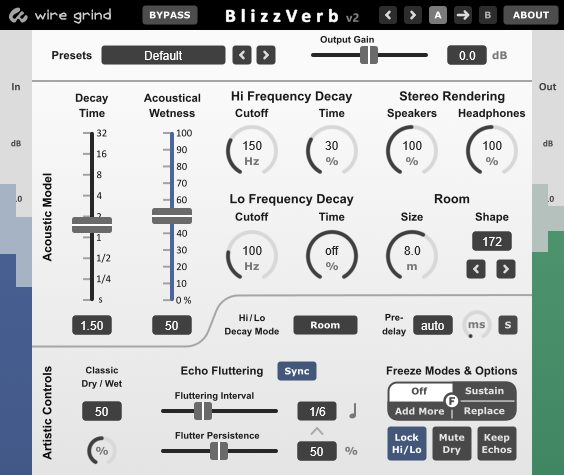
Bring your mix to life. BlizzVerb features a core "Acoustic Model" for realistic, immersive depth, as well as "Artistic Controls" for sounds that are more vintage, classic, progressive, or experimental.
New in version 2:- Freeze and Replace: Similar to regular freeze, but only the last played note is sustained.
- Echo Fluttering: Adds periodic fluctuations to the reverb.
- Hi/Lo Decay Modes: Select "Room" for a natural sound, or "Tone" for stronger coloration.
- Predelay Modes: Adjust it manually, or just use the default auto mode!
- Seamless Parameter Changes: Change any parameter with virtually no audible side effects. Great for automation.
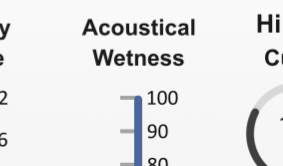
BlizzVerb's "Acoustical Wetness" slider causes the entire underlying acoustic model to be rebalanced. It provides a level of realism unmatched by the more common wet/dry and mix knobs that only blend the signal.
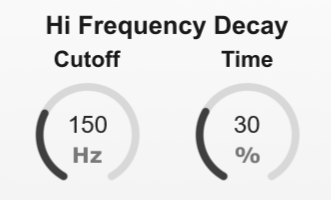
Reverberation decay time depends on frequency. We've looked at a lot of acoustical room measurements, and we found that real rooms tended to follow a general pattern. BlizzVerb's "cut-off" and "decay rate" parameters model this pattern, and it is far more realistic than ordinary high-pass and low-pass filters.
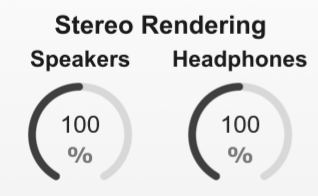
Reverberation is a great way to enhance stereo rendering, and BlizzVerb does this with two independent models. One model is for speakers, and the other is for headphones.
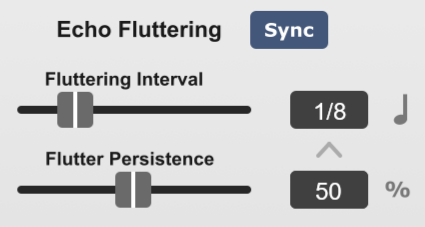
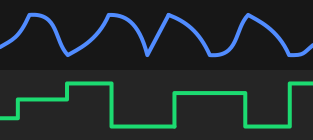
Inspired by an acoustic phenomenon known as "flutter echos," this feature causes the reverb to produce periodic waves of echos. It's like natural flutter, but more musical.
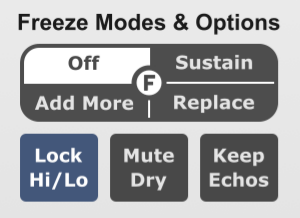
Lock-in sustained creative reverberation with this parameter. Use it to craft ambient pad sounds, creative transitions, and more.
FL Studio and Cubase users: The central "F" knob can be used to automate mode changes.

BlizzVerb will set predelay for you. It uses an amount that it thinks will sound the most realistic. We've included a knob this time in case you want to set it yourself.
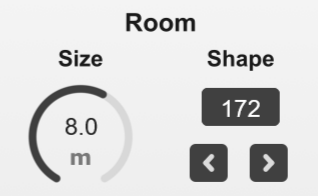
Each room "Shape" has a unique set of early echos, and they produce distinct temporal textures, stereo fields, and coloration. Results may be subtle, but improvements are definitive.
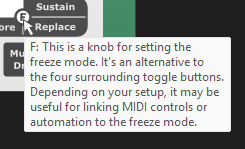
All of the controls display tool-tips when hovering for easy reference.
All parameters can be changed in real-time with near-zero audible side effects.
Audio Demonstrations
'%3e%3csodipodi:namedview%20pagecolor='%23ffffff'%20bordercolor='%23666666'%20borderopacity='1'%20objecttolerance='10'%20gridtolerance='10'%20guidetolerance='10'%20inkscape:pageopacity='0'%20inkscape:pageshadow='2'%20inkscape:window-width='1610'%20inkscape:window-height='898'%20id='namedview8'%20showgrid='false'%20inkscape:zoom='3.2777778'%20inkscape:cx='79.585109'%20inkscape:cy='20.137134'%20inkscape:window-x='0'%20inkscape:window-y='0'%20inkscape:window-maximized='0'%20inkscape:current-layer='svg8231'%20/%3e%3cdefs%20id='defs8233'%20/%3e%3cmetadata%20id='metadata8236'%3e%3crdf:RDF%3e%3ccc:Work%20rdf:about=''%3e%3cdc:format%3eimage/svg+xml%3c/dc:format%3e%3cdc:type%20rdf:resource='http://purl.org/dc/dcmitype/StillImage'%20/%3e%3cdc:title%3e%3c/dc:title%3e%3c/cc:Work%3e%3c/rdf:RDF%3e%3c/metadata%3e%3cpath%20inkscape:connector-curvature='0'%20style='fill:%23ffffff;fill-opacity:1;stroke:none;stroke-width:0.77777779px;stroke-linecap:butt;stroke-linejoin:miter;stroke-opacity:1'%20d='M%202,16%2016,8.2222218%202,2%20Z'%20id='path879'%20/%3e%3c/svg%3e)

User Manual
'%20xmlns:inkscape='http://www.inkscape.org/namespaces/inkscape'%20xmlns:sodipodi='http://sodipodi.sourceforge.net/DTD/sodipodi-0.dtd'%20xmlns='http://www.w3.org/2000/svg'%20xmlns:svg='http://www.w3.org/2000/svg'%20xmlns:rdf='http://www.w3.org/1999/02/22-rdf-syntax-ns%23'%20xmlns:cc='http://creativecommons.org/ns%23'%20xmlns:dc='http://purl.org/dc/elements/1.1/'%3e%3csodipodi:namedview%20id='namedview7'%20pagecolor='%238b8b8b'%20bordercolor='%23000000'%20borderopacity='0.25'%20inkscape:showpageshadow='2'%20inkscape:pageopacity='0'%20inkscape:pagecheckerboard='0'%20inkscape:deskcolor='%23d1d1d1'%20inkscape:document-units='mm'%20showgrid='false'%20inkscape:zoom='1.5633422'%20inkscape:cx='145.52156'%20inkscape:cy='149.03966'%20inkscape:window-width='1920'%20inkscape:window-height='1011'%20inkscape:window-x='0'%20inkscape:window-y='0'%20inkscape:window-maximized='1'%20inkscape:current-layer='svg5486'%20/%3e%3cdefs%20id='defs5480'%20/%3e%3cmetadata%20id='metadata5483'%3e%3crdf:RDF%3e%3ccc:Work%20rdf:about=''%3e%3cdc:format%3eimage/svg+xml%3c/dc:format%3e%3cdc:type%20rdf:resource='http://purl.org/dc/dcmitype/StillImage'%20/%3e%3c/cc:Work%3e%3c/rdf:RDF%3e%3c/metadata%3e%3cpath%20style='fill:none;stroke:%23ffffff;stroke-width:6.35;stroke-linecap:round;stroke-linejoin:round;stroke-dasharray:none;stroke-opacity:1;paint-order:stroke%20fill%20markers;stop-color:%23000000'%20d='m%2043.08632,36.489287%20-2.00603,7.486577%20H%206.06736%20L%204.06455,36.501271'%20id='path422-6'%20/%3e%3cg%20id='g1067-7'%20transform='matrix(1.5133988,0,0,1.5133988,-9.94996,-7.7284636)'%20style='stroke:%23ffffff;stroke-width:4.19585;stroke-dasharray:none;stroke-opacity:1'%3e%3cpath%20style='opacity:1;fill:none;stroke:%23ffffff;stroke-width:4.19585;stroke-linecap:round;stroke-linejoin:round;stroke-dasharray:none;stroke-opacity:1;paint-order:stroke%20fill%20markers;stop-color:%23000000'%20d='M%2022.152383,25.567861%20V%207.2046183'%20id='path978-5'%20sodipodi:nodetypes='cc'%20/%3e%3cpath%20style='opacity:1;fill:none;stroke:%23ffffff;stroke-width:4.19585;stroke-linecap:round;stroke-linejoin:round;stroke-dasharray:none;stroke-opacity:1;paint-order:stroke%20fill%20markers;stop-color:%23000000'%20d='M%2022.152383,25.567861%2028.140201,18.64861'%20id='path1035-35'%20/%3e%3cpath%20style='opacity:1;fill:none;stroke:%23ffffff;stroke-width:4.19585;stroke-linecap:round;stroke-linejoin:round;stroke-dasharray:none;stroke-opacity:1;paint-order:stroke%20fill%20markers;stop-color:%23000000'%20d='M%2022.152383,25.567861%2016.164565,18.64861'%20id='path1035-3-6'%20/%3e%3c/g%3e%3c/svg%3e) PDF Manual
PDF ManualTry the Demo Version For Free
The demo version can be installed using the program linked below. The installer also includes other optional free/demo plug-ins. Demo plug-ins have unlimited time, but they have two limitations:
- Parameters cannot be saved.
- A tone or chirp sound will periodically be added to the output.
- Operating System: Windows 7 or greater.
- Host Program: VST3 compatible host program.
To use or purchase this software, you must agree to the terms of the license agreement. A copy of this agreement can be found here.
Payment, Delivery, and PrivacyPayments are processed via third-party services (Stripe or Paddle). Purchases are delivered electronically. After payment, an automated email with download instructions will be sent immediately. Additional details on payment, delivery and privacy can be found in our terms & conditions. Feel free to contact us if you have any questions.
Prices include all taxes and fees.